
Reading the results
WCopyfind's reports are web pages saved on your computer. Here's how to read them.
What the numbers mean
For each matching pair, WCopyfind counts the words that fall inside matching phrases (phrases at least as long as your Match phrases of at least setting):
- Matching words: words in phrases the two documents share exactly. This is the number compared with your Report pairs that share at least setting.
- % of A, % of B: the matching words as a percentage of each document's length. If document A has 1,000 words, document B has 2,000, and they share 100, that's 10% of A and 5% of B. A high percentage on one side only often means that document was built largely from the other.
- Including imperfect (A / B): shown when you allow imperfect words. The number of words in matching phrases in each document, counting the changed words inside them. The two sides can differ slightly, because a word inserted in one copy has no partner in the other.
"<1%" means some text matched, but less than one percent of the document.
The list of matching pairs
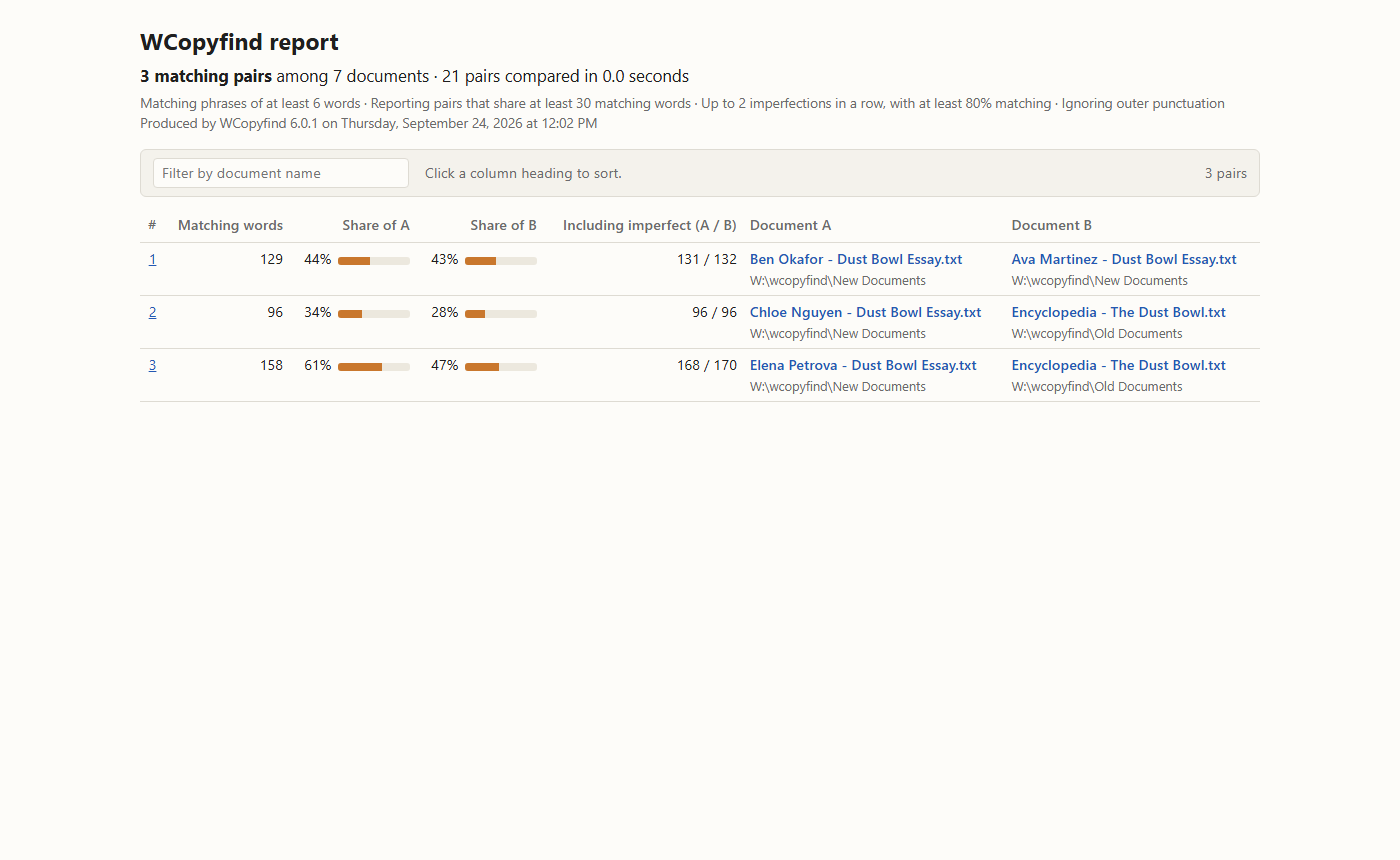
matches.html, the report's front page.The report opens with a summary: how many pairs matched, how many documents and pairs were compared, the settings used, and any documents that couldn't be read. Below is a table of the matching pairs.
- Type in the filter box to show only pairs involving a particular name.
- Click a column heading to sort by it; click again to reverse the order.
- Click a pair (its number or either document name) to open it side by side.
The small bars show each document's shared percentage at a glance.
The side-by-side pages
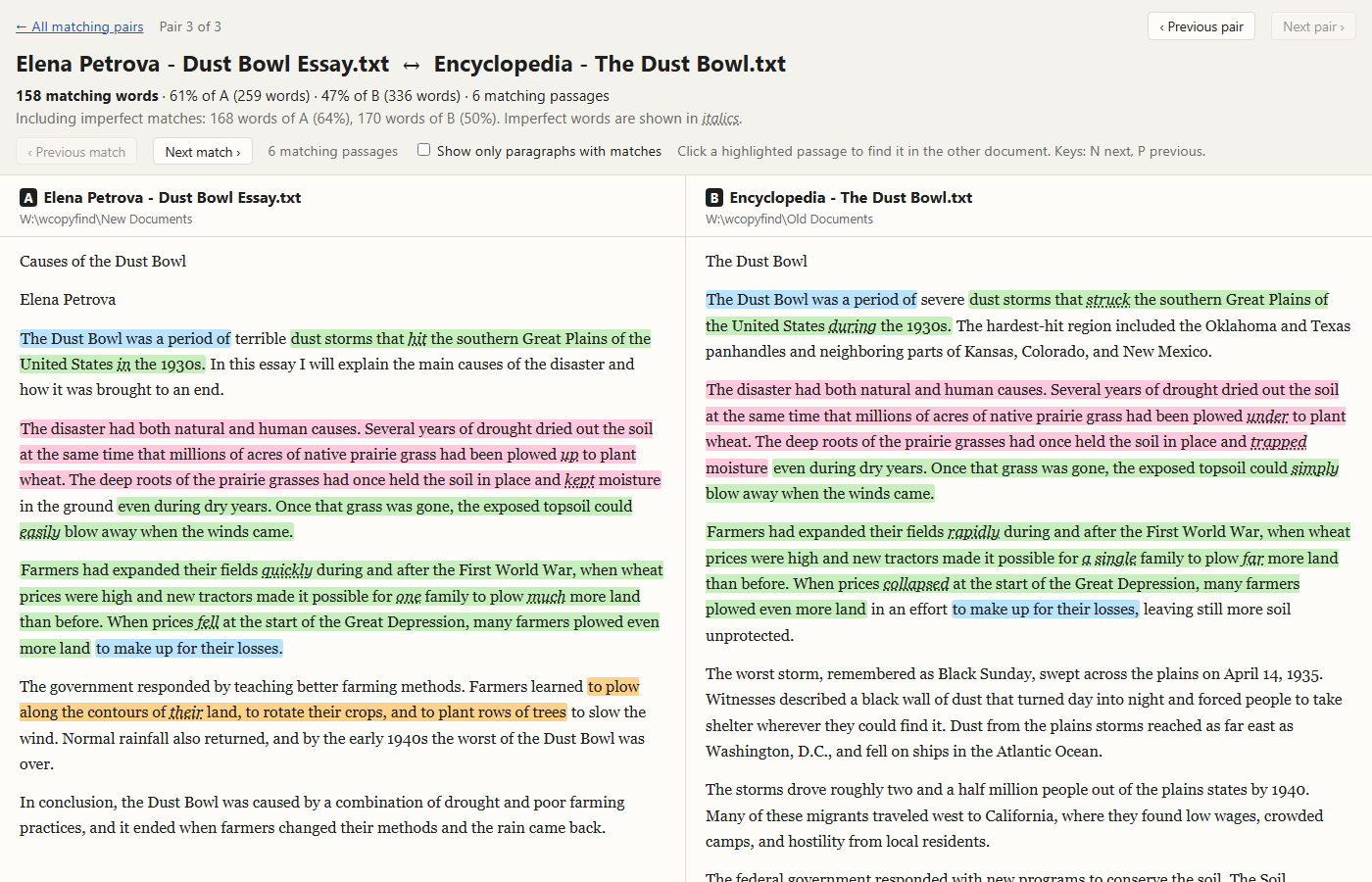
Each matching pair has its own page with the two documents next to each other. Each scrolls on its own.
- Highlighted passages are the matching phrases. Each phrase has the same color in both documents, and neighboring phrases alternate colors so you can tell them apart.
- Words in italics with a dotted underline are imperfect matches: words that differ between the copies but lie inside a matching passage.
- Click a highlighted passage and the other document scrolls to its twin, which briefly flashes.
- Next match / Previous match, or the N and P keys, step through the passages in order.
- Show only paragraphs with matches hides everything else, for a quick read of the shared material.
- Previous pair / Next pair move through the report without going back to the list.
The pages work in any modern browser, print cleanly, and follow your computer's light or dark setting. With the Brief report setting, they contain only the matching passages.
Interpreting matches
A match means two documents share wording. It doesn't, by itself, mean anyone did something wrong:
- Quotations and citations are supposed to match their sources. Check whether a matching passage is quoted and credited.
- Common phrases and boilerplate, such as an assignment prompt, a required heading, or a standard definition, match across many documents. They show up as short matches spread over many pairs.
- Shared sources create matches between students who quoted the same source, even if neither copied the other. Adding the source to the old documents makes this clear: both students will match it.
- Copying between students tends to show up as long runs of matching text, in the same order, including distinctive wording and mistakes.
Use the report as evidence to look at closely, not as a verdict. For more, see about plagiarism.
The files in the report folder
| File | Contains |
|---|---|
matches.html | The list of matching pairs, described above. Open this one. |
pairs\pair-00001.html, … | One side-by-side page per matching pair. |
matches.txt | The same list as plain text for spreadsheets and scripts: one line per pair with five tab-separated columns: exactly matching words, words in matching phrases in A, words in matching phrases in B, and the full names of documents A and B. The format is the same as in earlier versions (now in UTF-8, so all file names survive). |
log.txt | A record of the run: each document loaded, progress, each match, and the total time. |
To keep a report, copy the whole report folder somewhere else before your next comparison, which replaces it. You can also save the list of pairs shown in WCopyfind's window: right-click it and choose Save List to File.