Free plagiarism detection · Windows
Find the phrases your documents share
WCopyfind compares a collection of documents with one another and shows you, side by side, every passage they have in common, even when a few words were changed. It's free, it's fast, and it runs entirely on your own computer.
Your documents never leave your computer.
No installation, no account, no internet needed. Download details
What WCopyfind does
Compares every pair
Give it a class set of papers and it compares each paper with every other one, and with any sources or past papers you add. Hundreds of documents take seconds.
Sees through small edits
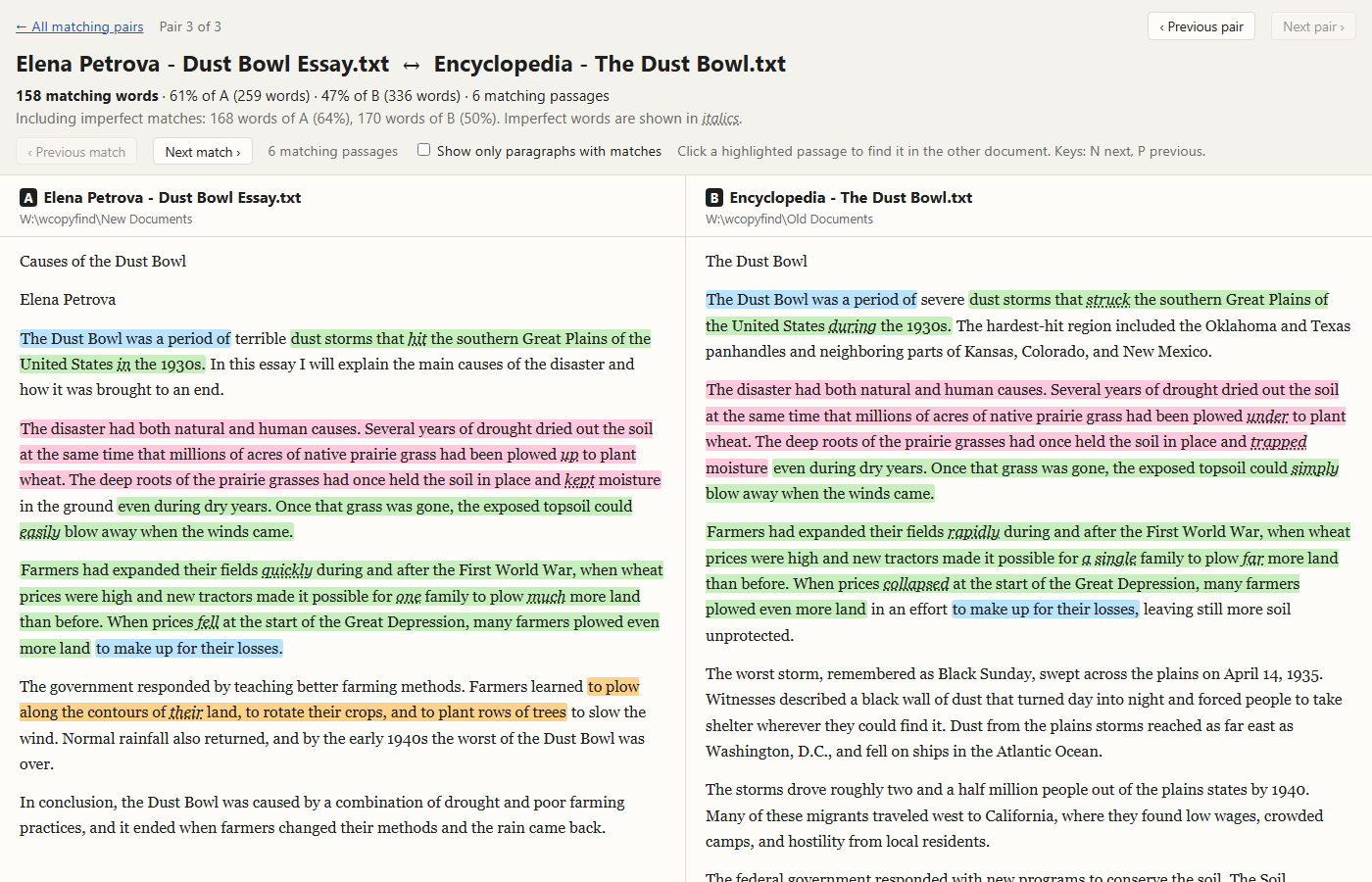
Copied passages are found even when the copier changed a word here and there, and WCopyfind shows which words differ.
Shows the evidence
Each matching pair opens side by side in your browser, with every shared passage highlighted in both documents. Click one to jump to its twin.
Your documents never leave your computer
WCopyfind and WRepeatfind read and compare your files right where they are, on your own PC. Nothing is uploaded, nothing is stored in the cloud, and no one else's computer ever sees your text. There's no account to create and nothing to sign in to, and the programs work without an internet connection.
That makes them safe for the documents that matter most: student papers, unpublished manuscripts, theses, legal and business files, and anything confidential. Many online plagiarism checkers keep a copy of every paper submitted to them. These programs keep nothing, because they never receive anything.
The one exception is by your choice: if you add an internet shortcut to WCopyfind, it downloads that web page to compare it. It never sends your documents anywhere. Read the full privacy statement.
How it works, in three steps
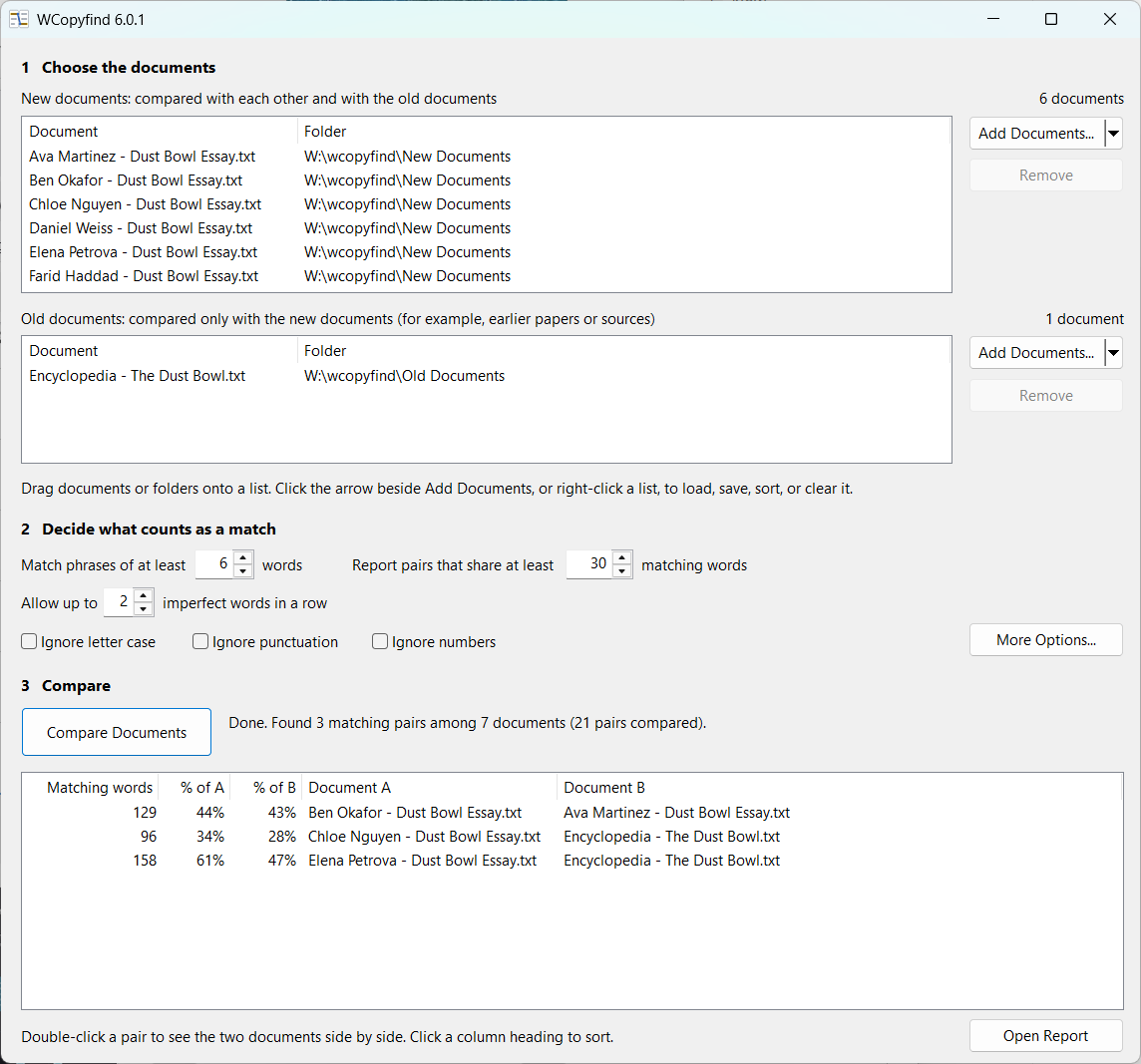
- Choose the documents. Drag a folder of papers into the New documents list. They'll be compared with each other. Put sources, past years' papers, or saved web pages in the Old documents list; they'll be compared only with the new ones.
- Decide what counts as a match. The shortest phrase to match (six words is a good start), how many shared words make a pair worth reporting, and whether to allow a few changed words.
- Compare. Pairs that share enough text appear as they're found. Double-click one to see the two documents side by side.
Read the step-by-step guide → or download sample documents to try it in a minute.
Who uses WCopyfind
- Teachers and professors checking term papers, lab reports, and take-home exams for copying between students and from sources
- Honor and conduct officers documenting suspected plagiarism clearly and fairly
- Researchers tracing how language moves: between news services, from lobbyists into legislation, through scholarly literature
- Editors and publishers comparing drafts, versions, and submissions
- Anyone who needs to know how much text two or two thousand documents have in common
Good to know
- Reads Word (.docx and .doc), plain text, web pages, and PDFs that contain text
- Works with any language that puts spaces between words
- Compares the documents you give it; it doesn't search the internet (you can add web pages, though)
- Free for any use, and open source under the GNU GPL
- Runs on 64-bit Windows 10 and 11; Mac and Linux users can use Wine
Looking for repetition inside one document?
WCopyfind's companion, WRepeatfind, uses the same engine to find the phrases a single article, thesis, or book repeats. Perfect for checking your own writing before you publish it.